客服熱線
186-8811-5347、186-7086-0265
官方郵箱
contactus@mingting.cn

添加微信
立即線上溝通

客服微信
詳情請(qǐng)咨詢客服
客服熱線
186-8811-5347、186-7086-0265
官方郵箱
contactus@mingting.cn
2022-06-27 來源:金山毒霸文檔/文件服務(wù)作者:辦公技巧
??為了文件的安全我們常常會(huì)設(shè)置密碼,那大家曉得excel如何撤銷保護(hù)密碼嗎?下面就是excel撤銷保護(hù)密碼的方法哦。
??excel撤銷保護(hù)密碼的方法
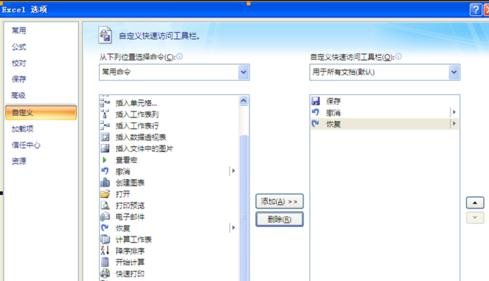
??1、打開
??excel撤銷保護(hù)密碼的方法圖1
??2、然后在左邊側(cè)框欄中選擇“查看宏”
??之后雙擊或者選擇添加按鈕,則可以看到右邊欄中有了查看宏按鈕,之后點(diǎn)擊右下角的確定。
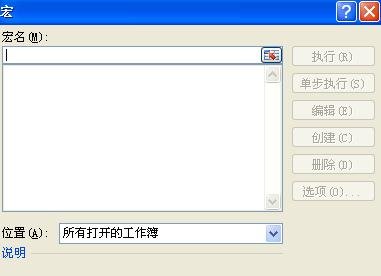
??3、大家可以在下面這個(gè)窗口處看到箭頭所指的按鈕:
??點(diǎn)擊按鈕,之后彈出窗口:

??excel撤銷保護(hù)密碼的方法圖2
??excel撤銷保護(hù)密碼的方法圖3
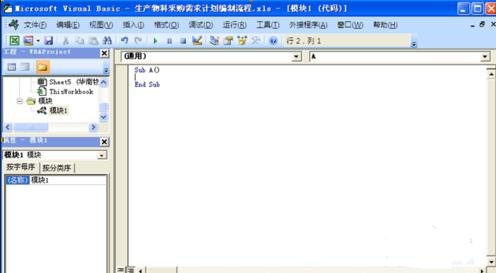
??4、在宏名處填寫一個(gè)名字(可隨意),然后點(diǎn)擊創(chuàng)建,彈出以下窗口:
??excel撤銷保護(hù)密碼的方法圖4
??5、將窗口內(nèi)的內(nèi)容全選后刪除,然后將下面分割線以內(nèi)的內(nèi)容開始復(fù)制粘貼在上面的窗口內(nèi):
??從橫線下開始復(fù)制
??------------------------------------------------------------------------------------------
??Option?Explicit
??Public?Sub?AllInternalPasswords()
??\'?Breaks?worksheet?and?workbook?structure?passwords.?Bob?McCormick
??\'?probably?originator?of?base?code?algorithm?modified?for?coverage
??\'?of?workbook?structure?/?windows?passwords?and?for?multiple?passwords
??\'
??\'?Norman?Harker?and?JE?McGimpsey?27-Dec-2002?(Version?1.1)
??\'?Modified?2003-Apr-04?by?JEM:?All?msgs?to?constants,?and
??\'?eliminate?one?Exit?Sub?(Version?1.1.1)
??\'?Reveals?hashed?passwords?NOT?original?passwords
??Const?DBLSPACE?As?String?=?vbNewLine?&?vbNewLine
??Const?AUTHORS?As?String?=?DBLSPACE?&?vbNewLine?&?_
??"Adapted?from?Bob?McCormick?base?code?by"?&?_
??"Norman?Harker?and?JE?McGimpsey"
??Const?HEADER?As?String?=?"AllInternalPasswords?User?Message"
??Const?VERSION?As?String?=?DBLSPACE?&?"Version?1.1.1?2003-Apr-04"
??Const?REPBACK?As?String?=?DBLSPACE?&?"Please?report?failure?"?&?_
??"to?the?microsoft.public.excel.programming?newsgroup."
??Const?ALLCLEAR?As?String?=?DBLSPACE?&?"The?workbook?should?"?&?_
??"now?be?free?of?all?password?protection,?so?make?sure?you:"?&?_
??DBLSPACE?&?"SAVE?IT?NOW!"?&?DBLSPACE?&?"and?also"?&?_
??DBLSPACE?&?"BACKUP!,?BACKUP!!,?BACKUP!!!"?&?_
??DBLSPACE?&?"Also,?remember?that?the?password?was?"?&?_
??"put?there?for?a?reason.?Don\'t?stuff?up?crucial?formulas?"?&?_
??"or?data."?&?DBLSPACE?&?"Access?and?use?of?some?data?"?&?_
??"may?be?an?offense.?If?in?doubt,?don\'t."
??Const?MSGNOPWORDS1?As?String?=?"There?were?no?passwords?on?"?&?_
??"sheets,?or?workbook?structure?or?windows."?&?AUTHORS?&?VERSION
??Const?MSGNOPWORDS2?As?String?=?"There?was?no?protection?to?"?&?_
??"workbook?structure?or?windows."?&?DBLSPACE?&?_
??"Proceeding?to?unprotect?sheets."?&?AUTHORS?&?VERSION
??Const?MSGTAKETIME?As?String?=?"After?pressing?OK?button?this?"?&?_
??"will?take?some?time."?&?DBLSPACE?&?"Amount?of?time?"?&?_
??"depends?on?how?many?different?passwords,?the?"?&?_
??"passwords,?and?your?computer\'s?specification."?&?DBLSPACE?&?_
??"Just?be?patient!?Make?me?a?coffee!"?&?AUTHORS?&?VERSION
??Const?MSGPWORDFOUND1?As?String?=?"You?had?a?Worksheet?"?&?_
??"Structure?or?Windows?Password?set."?&?DBLSPACE?&?_
??"The?password?found?was:?"?&?DBLSPACE?&?"$$"?&?DBLSPACE?&?_
??"Note?it?down?for?potential?future?use?in?other?workbooks?by?"?&?_
??"the?same?person?who?set?this?password."?&?DBLSPACE?&?_
??"Now?to?check?and?clear?other?passwords."?&?AUTHORS?&?VERSION
??Const?MSGPWORDFOUND2?As?String?=?"You?had?a?Worksheet?"?&?_
??"password?set."?&?DBLSPACE?&?"The?password?found?was:?"?&?_
??DBLSPACE?&?"$$"?&?DBLSPACE?&?"Note?it?down?for?potential?"?&?_
??"future?use?in?other?workbooks?by?same?person?who?"?&?_
??"set?this?password."?&?DBLSPACE?&?"Now?to?check?and?clear?"?&?_
??"other?passwords."?&?AUTHORS?&?VERSION
??Const?MSGONLYONE?As?String?=?"Only?structure?/?windows?"?&?_
??"protected?with?the?password?that?was?just?found."?&?_
??ALLCLEAR?&?AUTHORS?&?VERSION?&?REPBACK
??Dim?w1?As?Worksheet,?w2?As?Worksheet
??Dim?i?As?Integer,?j?As?Integer,?k?As?Integer,?l?As?Integer
??Dim?m?As?Integer,?n?As?Integer,?i1?As?Integer,?i2?As?Integer
??Dim?i3?As?Integer,?i4?As?Integer,?i5?As?Integer,?i6?As?Integer
??Dim?PWord1?As?String
??Dim?ShTag?As?Boolean,?WinTag?As?Boolean
??Application.ScreenUpdating?=?False
??With?ActiveWorkbook
??WinTag?=?.ProtectStructure?Or?.ProtectWindows
??End?With
??ShTag?=?False
??For?Each?w1?In?Worksheets
??ShTag?=?ShTag?Or?w1.ProtectContents
??Next?w1
??If?Not?ShTag?And?Not?WinTag?Then
??MsgBox?MSGNOPWORDS1,?vbInformation,?HEADER
??Exit?Sub
??End?If
??MsgBox?MSGTAKETIME,?vbInformation,?HEADER
??If?Not?WinTag?Then
??MsgBox?MSGNOPWORDS2,?vbInformation,?HEADER
??Else
??On?Error?Resume?Next
??Do?\'dummy?do?loop
??For?i?=?65?To?66:?For?j?=?65?To?66:?For?k?=?65?To?66
??For?l?=?65?To?66:?For?m?=?65?To?66:?For?i1?=?65?To?66
??For?i2?=?65?To?66:?For?i3?=?65?To?66:?For?i4?=?65?To?66
??For?i5?=?65?To?66:?For?i6?=?65?To?66:?For?n?=?32?To?126
??With?ActiveWorkbook
??.Unprotect?Chr(i)?&?Chr(j)?&?Chr(k)?&?_
??Chr(l)?&?Chr(m)?&?Chr(i1)?&?Chr(i2)?&?_
??Chr(i3)?&?Chr(i4)?&?Chr(i5)?&?Chr(i6)?&?Chr(n)
??If?.ProtectStructure?=?False?And?_
??.ProtectWindows?=?False?Then
??PWord1?=?Chr(i)?&?Chr(j)?&?Chr(k)?&?Chr(l)?&?_
??Chr(m)?&?Chr(i1)?&?Chr(i2)?&?Chr(i3)?&?_
??Chr(i4)?&?Chr(i5)?&?Chr(i6)?&?Chr(n)
??MsgBox?Application.Substitute(MSGPWORDFOUND1,?_
??"$$",?PWord1),?vbInformation,?HEADER
??Exit?Do?\'Bypass?all?for...nexts
??End?If
??End?With
??Next:?Next:?Next:?Next:?Next:?Next
??Next:?Next:?Next:?Next:?Next:?Next
??Loop?Until?True
??On?Error?GoTo?0
??End?If
??If?WinTag?And?Not?ShTag?Then
??MsgBox?MSGONLYONE,?vbInformation,?HEADER
??Exit?Sub
??End?If
??On?Error?Resume?Next
??For?Each?w1?In?Worksheets
??\'Attempt?clearance?with?PWord1
??w1.Unprotect?PWord1
??Next?w1
??On?Error?GoTo?0
??ShTag?=?False
??For?Each?w1?In?Worksheets
??\'Checks?for?all?clear?ShTag?triggered?to?1?if?not.
??ShTag?=?ShTag?Or?w1.ProtectContents
??Next?w1
??If?ShTag?Then
??For?Each?w1?In?Worksheets
??With?w1
??If?.ProtectContents?Then
??On?Error?Resume?Next
??Do?\'Dummy?do?loop
??For?i?=?65?To?66:?For?j?=?65?To?66:?For?k?=?65?To?66
??For?l?=?65?To?66:?For?m?=?65?To?66:?For?i1?=?65?To?66
??For?i2?=?65?To?66:?For?i3?=?65?To?66:?For?i4?=?65?To?66
??For?i5?=?65?To?66:?For?i6?=?65?To?66:?For?n?=?32?To?126
??.Unprotect?Chr(i)?&?Chr(j)?&?Chr(k)?&?_
??Chr(l)?&?Chr(m)?&?Chr(i1)?&?Chr(i2)?&?Chr(i3)?&?_
??Chr(i4)?&?Chr(i5)?&?Chr(i6)?&?Chr(n)
??If?Not?.ProtectContents?Then
??PWord1?=?Chr(i)?&?Chr(j)?&?Chr(k)?&?Chr(l)?&?_
??Chr(m)?&?Chr(i1)?&?Chr(i2)?&?Chr(i3)?&?_
??Chr(i4)?&?Chr(i5)?&?Chr(i6)?&?Chr(n)
??MsgBox?Application.Substitute(MSGPWORDFOUND2,?_
??"$$",?PWord1),?vbInformation,?HEADER
??\'leverage?finding?Pword?by?trying?on?other?sheets
??For?Each?w2?In?Worksheets
??w2.Unprotect?PWord1
??Next?w2
??Exit?Do?\'Bypass?all?for...nexts
??End?If
??Next:?Next:?Next:?Next:?Next:?Next
??Next:?Next:?Next:?Next:?Next:?Next
??Loop?Until?True
??On?Error?GoTo?0
??End?If
??End?With
??Next?w1
??End?If
??MsgBox?ALLCLEAR?&?AUTHORS?&?VERSION?&?REPBACK,?vbInformation,?HEADER
??End?Sub
??-----------------------------------------------------------------------------------------
??復(fù)制到橫線以上
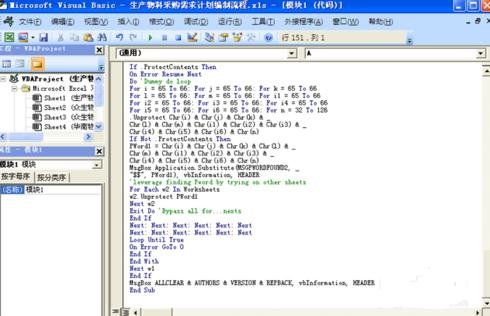
??得到情況如下圖表示
??excel撤銷保護(hù)密碼的方法圖5
??6、關(guān)閉編輯窗口;
??7、依次點(diǎn)擊菜單欄上的工具---宏-----宏,選AllInternalPasswords,運(yùn)行,確定兩次;
??等一會(huì),就會(huì)出現(xiàn)以下對(duì)話框:這就是Excel密碼對(duì)應(yīng)的原始密碼(此密碼和原先設(shè)置的密碼都能打開此文檔。如果是別人的文檔,你又想恢復(fù)密碼設(shè)置,就可以用此密碼進(jìn)行保護(hù),他就能用他設(shè)置的密碼打開,你可以試試,很有趣的。字母一定要大寫):
??再點(diǎn)擊確定。Excel的原始密碼就被清除了!!
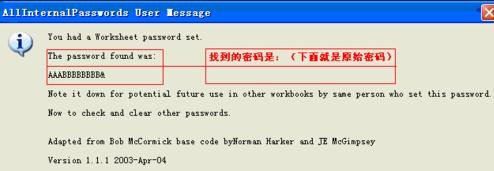
??excel撤銷保護(hù)密碼的方法圖6
??8、最后記得關(guān)閉EXCEL文檔時(shí)要保存,否則下回打開,文檔仍舊處于只讀狀態(tài)而無法修改。
??以上就是excel撤銷保護(hù)密碼的方法,希望可以幫助到大家。
最后,小編給您推薦,如果您不想讓您的文檔被其他人查看,您可以使用金山毒霸“文件夾加密”,讓文檔更加安全。
上一篇:如何清空電腦最近打開的文檔